


 Our Work


Real Estate
What Makes a Real Estate Agent App Actually Useful in the Field
By Mayank Pokharna (Coliving Expert)
• 9 min read
Mar 20, 2026
Share


Key Takeaways
- Most agent apps fail because they replicate desktop interfaces on a smaller screen.
- The best agent apps are built around field workflows, not back-office logic.
- CRM access, offline mode, and digital form submission are the highest-impact features.
- Route planning and calendar integration reduce wasted time between appointments.
- Agent adoption is the real measure of an app’s success, and adoption follows usability.
- A well-designed agent app reduces admin time by keeping data entry in the field.
Most real estate businesses have tried at least one agent app. And most of them have the same story: the app was launched, adoption was low, agents went back to their notebooks and WhatsApp groups, and the app quietly died. This is not because agents resist technology. It is because most agent apps are not designed around how agents actually work. This article covers the features that genuinely improve field productivity and why they work when everything else falls short.
Why Agent Apps Often Miss the Mark
The typical agent app is built by taking the desktop CRM or property management system and making it accessible on a phone. The result is a shrunken version of a back-office tool that was never designed for field use in the first place. Agents in the field need to move fast. They are between viewings, on calls, updating a client while standing in a property. They need to complete a task in under thirty seconds or they will not complete it at all. Apps that require navigation through multiple menus, full-page forms, or slow sync times get abandoned. The design philosophy for a field app has to start with the agent’s day, not the system’s data model.
The Features That Actually Move the Needle
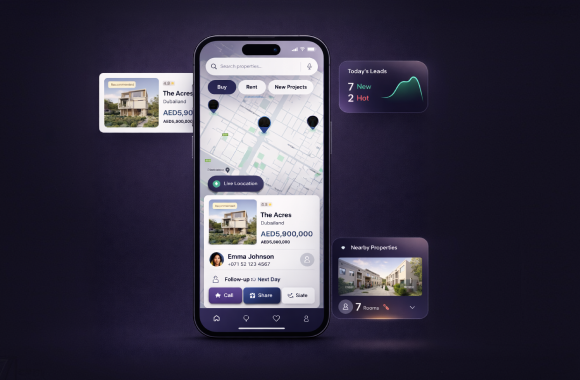
Based on how property professionals work, the following features deliver the most consistent impact on field productivity: Instant lead notification with one-tap contact. When a new lead comes in, the agent sees it immediately and can call or message from the same screen without switching apps. Digital viewing notes with voice-to-text input. Rather than typing detailed notes after a viewing, agents can dictate their observations in real time and have them attached to the correct property and contact record. On-site document access. Agents need to pull up tenancy agreements, listing sheets, floor plans, and compliance documents while with a client. Everything should be available without internet dependency. One-tap status updates. Changing a listing from available to under offer, logging a viewing, or marking a follow-up as complete should take a single tap, not a workflow.
CRM Access and Lead Management on the Go
A field agent is the closest point to the client. If they cannot update the CRM while that information is fresh, data quality across the whole organisation suffers. Agent apps connected directly to the CRM allow: Real-time lead status updates from the field Call logs that populate automatically after a call ends Follow-up scheduling with calendar sync Client notes added immediately after a meeting Lead assignment and hand-off between agents without going back to the office The outcome is a CRM that stays clean and current rather than relying on agents to spend their evenings doing data entry.
Property and Listing Management in the Field
Agents often need to make quick changes to listings while they are at the property or between appointments. The ability to do this from a phone, without going through a desktop, saves time and removes the back-and-forth with an admin team. Useful listing management features for field agents include: Uploading photos directly from the device camera to the listing Editing price, status, or description on the go Accessing previous listing history and viewing records Sharing a live listing link directly with a client by message or email These tasks sound small individually. But when an agent handles ten to fifteen active listings, the cumulative time saving is significant.
Offline Functionality: The Feature Teams Overlook
Properties are not always in areas with strong connectivity. Basements, rural locations, newly developed areas, and older buildings often have poor or no mobile signal. An agent app that requires internet access to function is an agent app that fails at the exact moment it is needed most. Offline functionality means the app stores key data locally: client information, viewing schedules, listing details, and documents. The agent can access and update everything while offline. When connectivity returns, the app syncs automatically. This is one of the most consistently undervalued features in agent app development, and one of the most appreciated by agents who work across varied property types and locations.
Route Planning and Diary Management
Time between appointments is wasted time. Route planning integrated into the agent app reduces travel time by clustering viewings geographically and suggesting the most efficient order. Combined with a built-in diary view, agents can see their full day, navigate to each property, and review client notes for the next appointment, all within one app and without switching to separate navigation or calendar tools. Diary management features that agents find genuinely useful: Daily schedule view with property addresses linked to maps Client reminders sent automatically before viewing appointments Viewing confirmation requests sent to clients from within the app Post-viewing follow-up reminders that appear automatically after each appointment
What Good Agent App Design Looks Like
The design principle behind a genuinely useful agent app is the 30-second rule: any task an agent needs to complete in the field should take no more than 30 seconds. This means minimal navigation depth. Core actions should be accessible from the home screen or within one tap. It means large touch targets, readable fonts in daylight conditions, and clear action confirmations so agents know their input was saved. Speed is a design feature. An app that loads slowly, syncs slowly, or responds slowly will not be used, regardless of how many features it has. Our Real Estate Mobile App Development page covers how we design and build agent apps that are adopted and used, not installed and ignored.
Conclusion
The agent apps that get used are the ones built around the 30-second rule. Not around the system’s data model, not around what a desktop CRM can do on a smaller screen, but around what an agent needs to complete in the time between stepping out of one viewing and into the next. Adoption is the only metric that matters for a field tool. An app with ten features that agents use every day is worth more than one with fifty features that no one opens. The features that drive adoption are consistently the same: fast lead notifications, one-tap updates, offline access, and a diary that reflects the agent’s actual day. The businesses that get this right do not just improve agent efficiency. They improve data quality across the whole organisation, because the CRM is updated in real time by the people closest to the client, rather than reconstructed from memory at the end of the day. Build for the agent’s day. Everything else follows.
FAQ
When in doubt always ask?
The most important features are: instant lead notifications with one-tap contact, CRM access and update capability from the field, digital viewing notes, offline document access, on-site status updates for listings, and route planning with calendar integration.
Agents stop using apps when they are slow, require too many steps to complete simple tasks, or are not designed around field workflows. Apps that replicate desktop interfaces on a phone rarely survive past the first few weeks of use.
Yes, if it is built with offline functionality. Offline-first apps store data locally and sync when connectivity is restored. This is essential for agents working in properties with poor mobile signal.
A well-built agent app integrates directly with the CRM via API so that any update made in the field, whether a lead note, a viewing log, or a status change, is immediately reflected in the central system. No manual data re-entry is required.
A generic CRM app is built for broad commercial use. A real estate agent app is designed specifically for property workflows: viewing management, listing access, tenancy documents, and property-specific lead handling. The specificity makes it significantly more useful in daily practice.
Key metrics include daily active users among the agent team, number of CRM updates made through the app versus desktop, average response time to new leads, and agent-reported time spent on admin tasks. Adoption rate is the primary signal.